Mirror Link Car Screen Cast
- 3.4
- Rating
- 10.00K
- Installs
- Free
- Price
 Analysis by App-foxy
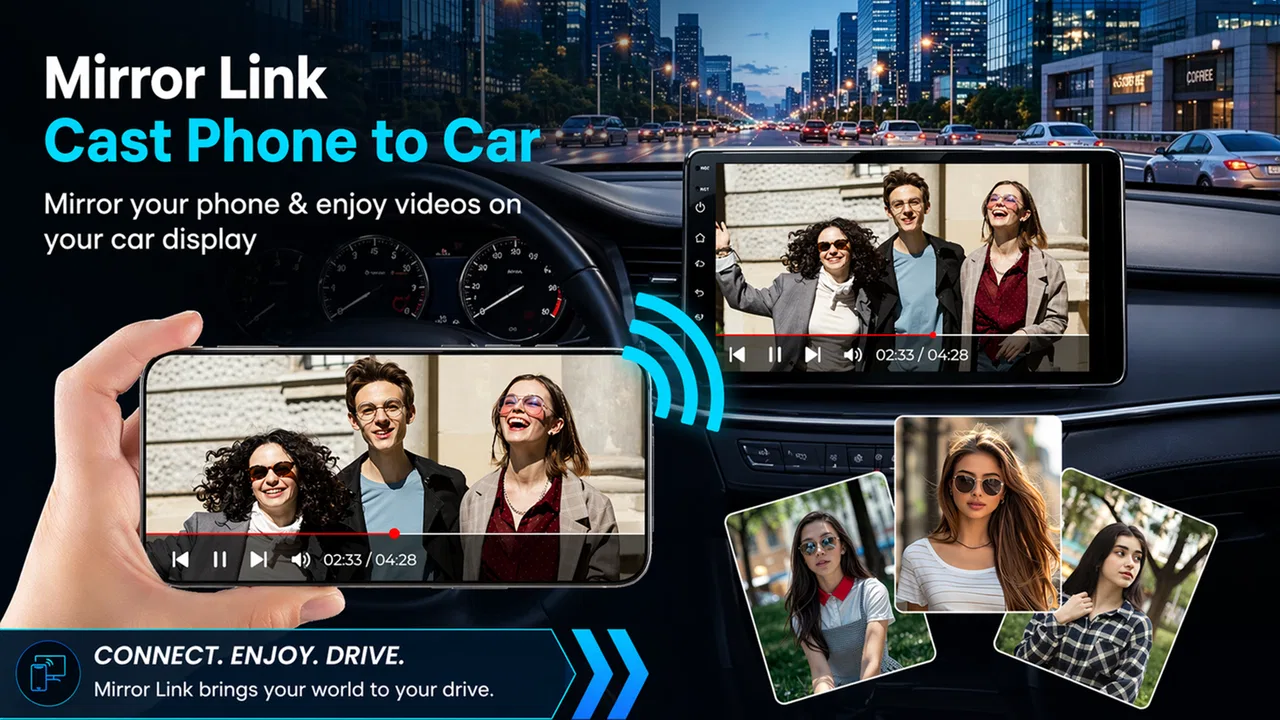
Mirror Link Car Screen Cast is the kind of app I would test with a very specific question in mind: can it make a phone easier to use when I am sitting in a compatible car environment? Its purpose is screen casting through MirrorLink and screen sharing, so the appeal is straightforward. Instead of passing a phone around or trying to view a small display, I can attempt to bring the phone’s screen into a larger in-car setting.
That sounds useful, but it is not the same as saying that every phone, vehicle, or display will work equally well. In my experience with apps in this area, the difficult part is often the connection between devices rather than the casting button itself. The phone, car display, cable or wireless path, and receiving system all have to cooperate. That makes this a practical utility for the right setup, not a universal replacement for every built-in infotainment system.
Developed by wide tech, this free app sits in the libraries and demo section rather than presenting itself as a full navigation, music, or messaging platform. Its store summary focuses on casting a phone screen to a car display, while the short description simply identifies it as a Mirror Link tool. That narrow focus is important: I judge it mainly by how clearly and conveniently it helps with screen sharing, not by expecting it to provide a complete driving platform.
You May Also Like

 AccuWeather: Weather Radar
AccuWeather Review: A Quick, Clear Forecast for Everyday Decisions
For everyday plans, the best forecast is the one you can understand quickly. AccuWeather makes rain timing, radar, and local conditions easy to act on, with a few trade-offs.

 Hill Climb Racing
Why Hill Climb Racing Still Turns Crashes Into One More Run
A tiny car, a bumpy hill and one more upgrade: Hill Climb Racing keeps resurfacing because its simple chaos makes every near-miss feel personal.

 AliExpress - Shopping App
AliExpress Makes Global Shopping Feel Personal, but Shoppers Bear the Risk
AliExpress turns a global marketplace into a pocket-sized discovery engine. Its reach is useful, its shopping loop compelling, and its trade-offs easy to miss.

 Lords Mobile: Kingdom Wars
Lords Mobile Is a Kingdom-Building Routine, Not a Quick Match
A case-by-case verdict on the building, battles, device demands, and social commitments that make Lords Mobile rewarding for some players and exhausting for others.

 PDF Scanner app - TapScanner
TapScanner Makes Paperwork Easier to Capture, Check, and Share
TapScanner makes scanning with a phone feel less like a rescue operation and more like a dependable step in getting work done. Its capture tools are useful, though not flawless.

 Block Blast!
 Shows How Much a Puzzle Game Can Leave Out
A quiet grid game shows why puzzle players increasingly value instant clarity, repeatable skill and low-pressure play—and where the genre still needs to catch up.
More From Our News Desk
View All News


How the connection shapes the experience
I’d use this section to focus on the practical handoff between the phone and the car display: a cast is only helpful when the picture arrives clearly and stays usable. Before depending on it, I’d decide what I need to show and make sure the phone is ready to hand that screen over without exposing anything personal. That small bit of preparation makes the connection easier to judge and the result more useful.
What happens when the network or device link is doing the work
The most important thing to understand is that screen casting is a live connection. The phone is not merely sending a file once and waiting for the car to open it; the display has to keep receiving what is happening on the phone. Because of that, the quality of the experience depends heavily on the connection path and on the receiving display. A stable link should feel much more natural than one that repeatedly drops, pauses, or needs to be restarted.
I would therefore begin by treating the first launch as a compatibility check rather than assuming success. Open the app before relying on it for a trip, connect the phone to the intended car display, and test the exact arrangement you plan to use. If the car has more than one input or connection method, testing each one separately can save frustration later. The useful question is not only whether the app installs, but whether the complete phone-to-display chain responds consistently.
One practical detail is that a larger car screen can expose problems that are easy to miss on a phone. A small delay may be tolerable when checking a screen for a moment, but it becomes irritating when trying to follow a changing interface. Likewise, a portrait-oriented phone screen may not look comfortable on a wide dashboard display. I would check readability, orientation, and whether touch interaction behaves in a way that makes sense before deciding that the setup is ready for regular use.
The strongest use case is a compatible setup that has already been tested at home or while parked. That preparation changes the app from a hopeful experiment into a predictable tool. I would not make the first connection attempt during a busy journey, especially if I needed the display immediately.
Why a live cast is different from built-in car software
Built-in car systems usually have a more controlled relationship between the vehicle and the phone. Their menus are designed around the display, controls, and driving environment. A screen-casting app takes a different route: it tries to show the phone’s screen in the car context. That can be more flexible, but it can also feel less polished because the phone interface was not necessarily designed for a dashboard.
This difference affects who should choose it. If I only want familiar car functions such as navigation, audio control, and hands-free communication, a native system or an established phone-integration platform may be the better option. Mirror Link Car Screen Cast becomes more interesting when the main requirement is viewing the phone screen itself on a compatible display and the usual alternatives do not provide the flexibility I need.
There is also a safety trade-off. A larger screen can make certain information easier to see, but it does not automatically make every phone app suitable for driving. I would keep interactions brief, prepare what I need before moving, and avoid treating the cast display as permission to browse freely while driving. The app can change where the screen appears; it does not remove the need for sensible driving habits.
Useful mobile situations beyond the daily commute
The obvious scenario is a driver who wants a phone display visible in a compatible car. A more realistic everyday example would be a family member preparing a route before leaving. I could connect the phone while parked, confirm that the car display mirrors correctly, set up the needed screen, and then leave the phone alone. If the connection remains stable, the larger view may be more convenient than repeatedly checking the handset.
Another use is demonstrating something on a phone to passengers. A map preview, a photo, or a setting can be easier to discuss when several people can see a larger display. In that situation, the value is not constant driving assistance but temporary shared viewing. I would still disconnect afterward rather than leaving the phone exposed on the car screen when it is no longer needed.
The app may also suit someone testing an older or less integrated vehicle display. Instead of replacing the head unit immediately, that person can see whether a screen-sharing workflow is useful enough to justify keeping. This is a sensible trial approach, although the result depends on compatibility. A car with no suitable receiving capability will not become compatible simply because the app is installed.
For passengers, the experience can be more forgiving. A passenger can help reconnect the phone, adjust the source screen, or stop the cast without distracting the driver. That makes shared trips a better testing environment than solo driving. I would use the passenger seat to learn the routine: connect, confirm the image, check whether the display remains responsive, and understand what to do if the picture disappears.
Failure points and a calmer recovery routine
Connection failures are the main friction I would plan for. The screen may not appear, the receiving display may remain on the wrong input, or the cast may stop after the phone changes state. These problems do not necessarily mean the app is unusable, but they do mean that recovery should be simple enough to perform while parked.
My first recovery step would be to stop interacting with the phone and check the obvious physical and display-side details. Is the car showing the correct source? Is the phone still connected through the intended path? Has the screen gone to sleep? If the vehicle has its own connection menu, I would confirm that it still recognizes the phone before repeatedly tapping inside the app.
If that does not help, I would end the connection cleanly, return to the phone’s starting screen, and reconnect from the beginning. A full restart of the casting sequence is often more useful than changing several settings at once because it reveals which part of the chain failed. I would also test with other phone activity closed or minimized, not because every background app is necessarily a problem, but because a simpler starting state makes troubleshooting easier.
A valuable habit is to keep a backup plan. If I depend on the cast for directions, I would make sure the phone itself remains usable and that I know where I am going before departure. If the display fails, the trip should not depend on frantic troubleshooting. This is one of the clearest differences between a helpful convenience and an essential safety system.
It is also worth separating a temporary connection failure from a compatibility problem. If the app works repeatedly with the same car and phone but fails after a particular change, the new device or connection method deserves attention. If it never completes a reliable connection despite careful testing, I would stop investing time and choose a better-matched alternative. Persistence cannot overcome an incompatible receiving system.
Keeping mobile data and battery use under control
Screen sharing can encourage longer sessions, and longer sessions naturally make data and battery worth considering. I would avoid starting a cast with a nearly empty phone because the display activity and connection work can make the remaining charge disappear faster than expected. A charging arrangement that is already safe and convenient for the car is more useful than discovering the battery problem halfway through a journey.
For data-conscious use, I would prepare the phone before connecting. If the content I need can be arranged in advance, I would do that while on a trusted connection, then keep the cast focused on the chosen screen. I would not assume that casting itself makes other apps economical. If the mirrored screen is showing a service that continuously loads content, that service may still use its own connection and data.
This is also where the app’s narrow purpose helps me set expectations. It is a display bridge, not a promise that every activity shown on the phone becomes independent of connectivity. If the phone needs a network to load a map, page, account screen, or media service, the cast does not change that requirement. I would plan the phone’s connection and content separately from the act of displaying it.
Privacy deserves attention as well. A mirrored screen can reveal notifications, messages, account details, or other personal material to anyone who can see the car display. Before connecting, I would clear sensitive notifications and choose a screen that contains only what I intend to share. This is especially important when passengers are present or when the vehicle is being used by more than one person.
Who will appreciate it, and who should skip it
I think the app is best suited to people who already have a compatible car display and want to explore phone screen sharing without immediately changing their hardware. It may also appeal to passengers, families sharing a vehicle, and users who need a temporary visual bridge rather than a complete infotainment replacement. The free entry point makes that experimentation easier, although optional purchases are listed at $2.99 per item, so I would check the purchase prompts carefully before committing to anything.
I would be more cautious if I needed guaranteed reliability every morning. A person whose work depends on uninterrupted navigation or communication may prefer a mature built-in integration, even if it offers fewer screen-sharing possibilities. I would also skip this app if my car has no compatible receiving function, if I dislike troubleshooting device connections, or if I want a purpose-built interface instead of a phone screen shown at a larger size.
It is not a strong fit for someone expecting the app alone to add car controls, transform an incompatible dashboard, or make every phone application comfortable to use while driving. Its usefulness begins with the hardware and connection already available. That is not a flaw unique to this app, but it is a limitation that should shape the purchase decision.
What the current release and store profile suggest
The app was released on October 28, 2025, and the current version is 1.0.6. I see that as a relatively early stage for a utility whose success depends on many combinations of phones and car displays. Early versions can be perfectly useful, but I would approach the app as something to test in my own setup rather than assuming that a positive result on one device guarantees the same result elsewhere.
Its public store profile shows over ten thousand installs and an average rating of 3.4 from around sixty ratings, with two written reviews. That combination tells me there is some real-world interest, but the rating is mixed enough that I would not treat the app as universally dependable. For a connection tool, individual hardware differences can explain part of that variation, which is another reason to test before relying on it.
The content rating is Everyone, and the app is free to install. Those details make it approachable for casual experimentation, but they do not remove the need to think about privacy, screen visibility, and safe use in a moving vehicle. The practical risk is not the age label; it is what appears on the mirrored screen and how much attention the driver gives to it.
My connectivity verdict
After looking at the app through the lens of everyday connectivity, I would describe Mirror Link Car Screen Cast as a focused option for a specific problem: getting a phone screen into a compatible car display. Its best quality is that it aims at a clear task rather than pretending to replace every part of a vehicle’s infotainment system. When the connection works and the phone is prepared properly, it can make shared viewing and occasional in-car access more convenient.
The trade-off is predictability. The experience depends on the receiving display, the phone, the connection method, and whatever is being shown. A successful first try is encouraging, but repeated tests are more meaningful. I would test it while parked, prepare a recovery routine, protect private notifications, and keep a backup way to use the phone if the cast stops.
My recommendation is therefore conditional but positive. If you already have a compatible setup and want a free way to investigate screen sharing, it is worth trying. If you need a polished, hands-off driving interface or guaranteed compatibility, I would choose the usual built-in alternative instead. For me, this is a useful connectivity experiment that can become a handy daily tool, but only after the phone and car prove that they can work together reliably.
FAQs for Mirror Link Car Screen Cast
01What is Mirror Link Car Screen Cast and how does it work?
Mirror Link Car Screen Cast is an app designed to mirror your smartphone's screen onto your car's infotainment system. It connects via USB or Bluetooth, allowing you to access apps, navigation, and media directly from your car's dashboard. The app aims to enhance driving convenience and safety by reducing the need to handle your phone.
02Is Mirror Link Car Screen Cast compatible with all car models?
Mirror Link Car Screen Cast supports a wide range of car models, but compatibility may vary based on the vehicle's infotainment system. It's essential to verify if your car's system supports Mirror Link technology. Some older models might require software updates or additional hardware for seamless integration.
03Does Mirror Link Car Screen Cast support all smartphone brands?
While Mirror Link Car Screen Cast supports most Android and iOS devices, not all smartphone brands may be fully compatible. Ensure your device's operating system is up-to-date, and check the app's compatibility list. Some features might be limited based on the smartphone model and operating system version.
04Are there any safety concerns associated with using Mirror Link Car Screen Cast?
Safety is a priority for Mirror Link Car Screen Cast. The app is designed to minimize distractions by mirroring essential apps like navigation and music. However, users should always adhere to local laws and avoid using the app for activities that could impair focus while driving. It's crucial to prioritize road safety at all times.
05What are the main features and benefits of using Mirror Link Car Screen Cast?
Mirror Link Car Screen Cast offers seamless integration of smartphone apps with your car's infotainment system. Key features include access to navigation, music, and communication apps, enhancing the driving experience. The app reduces the need to handle your phone, promoting safer driving. It also supports voice commands for hands-free operation.
Pros
- Seamless integration with most car systems.
- Minimal lag for real-time mirroring.
- User-friendly interface design.
- Customizable display settings.
- Supports a wide range of apps.
Cons
- Limited compatibility with older car models.
- Requires stable internet for optimal use.
- Some features are locked behind paywalls.
- Occasional connectivity drops.
- Consumes significant battery power.

Mirror Link Car Screen Cast
Gallery